Luckyfield: A Delicate Script Font for Elegant Web Designs
As I was finalizing the design for a boutique online store, I stumbled upon Luckyfield, a font that instantly caught my eye with its elegant and refreshing look. This script font is not just visually appealing; it exudes a sense of class and sophistication, making it perfect for projects that need a touch of refinement.
First Impressions: Testing Luckyfield in a Hero Section
I decided to test Luckyfield in the hero section of the homepage. The delicate curves and flowing lines of this font made the welcome message feel more inviting and personal. It was a breath of fresh air compared to the more rigid and traditional fonts I had initially considered.
Visual Characteristics and Personality
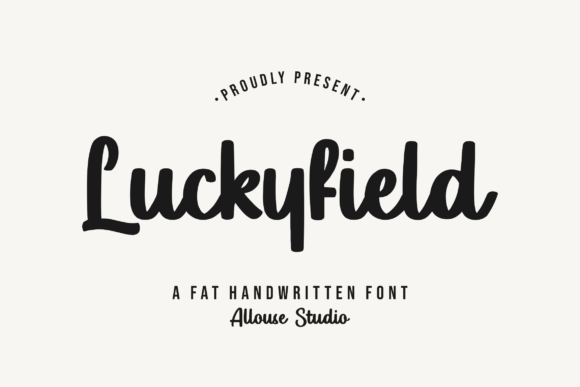
Luckyfield has a unique personality that blends elegance with a hint of playfulness. Its handwritten style gives it a human touch, making it ideal for creating a warm and welcoming brand identity. The font's thin, graceful strokes and well-balanced spacing make it highly legible even at smaller sizes, which is crucial for a seamless user experience.
Using Luckyfield Across Different Web Elements
After seeing how well Luckyfield worked in the hero section, I explored other areas where it could add value. Here are some key places where this font can shine:
- Headers and Titles: Perfect for main headings and subheadings, Luckyfield adds a touch of elegance without overwhelming the design.
- Call-to-Action Buttons: Short, impactful phrases in Luckyfield can make CTA buttons more engaging and visually appealing.
- Banners and Ad Graphics: Use Luckyfield for short, attention-grabbing text in banners and digital ads to draw the viewer's eye.
- Logo Text and Branding: The font's refined style makes it an excellent choice for logo design and branding elements, enhancing the overall professional look.
Readability and Visual Hierarchy
One of the most important aspects of any font is readability. Luckyfield maintains a good balance between style and legibility, making it suitable for both large and small text. For mobile screens, I recommend using it sparingly and ensuring there is enough contrast, especially when placed over images or colored backgrounds.
To maintain a clear visual hierarchy, I paired Luckyfield with a clean, simple sans serif font for body text. This combination ensures that the content remains easy to read while still benefiting from the decorative flair of Luckyfield.
Real-World Examples and Applications
Here are a few real-world examples of how Luckyfield can be used effectively:
- Creative Portfolio: Use Luckyfield for the main heading and project titles to give your portfolio a polished and professional look.
- Boutique Online Store: Apply Luckyfield to category headers and promotional banners to create a sophisticated shopping experience.
- Coaching Website: Incorporate Luckyfield into the welcome message and service descriptions to convey a sense of trust and expertise.
- Product Landing Page: Utilize Luckyfield for the main headline and key features to make the product stand out and engage potential customers.
Font Pairing and Design Consistency
When using Luckyfield, it's essential to pair it with complementary fonts to maintain a cohesive design. I found that a simple sans serif like Roboto or Open Sans works well for body text, while a classic serif like Georgia can add a touch of editorial elegance to longer sections.
Consistency is key in web design. By using Luckyfield consistently across different elements, such as headers, buttons, and callouts, you can create a strong and recognizable brand identity.
Final Considerations Before Using Luckyfield
Before incorporating Luckyfield into your web design, here are a few things to check:
- Included Styles and Weights: Ensure the font includes the styles and weights you need for your project.
- Webfont Availability: Verify that the font is available in web-friendly formats (e.g., WOFF, WOFF2) for optimal performance.
- Multilingual Support: Check if the font supports the languages you need, especially if your website has a global audience.
- Commercial Licensing: Make sure you have the appropriate license for commercial use, especially if you're designing for clients or online stores.
By carefully considering these factors, you can ensure that Luckyfield enhances your web design and contributes to a more polished and engaging user experience.